


If you use cable, then first you need to turn off your computer then your router then your modem (if you don’t have router then only your PC and modem)
Now turn on your Modem wait for all your lights turn on, and then you have to turn on your router wait for your lights to turn on and then turn on your PC.
Try to go to internet.
If it works: download Malwarebytes run it, then download combofix and run it. This will turn off your internet momentarily and wait until it clean all your system.
If it doesn’t work: go to internet explorer, look for “tools” click on “internet options” look for a tab called “connections” at the bottom says “LAN Settings” click on it.
Check the check box at the left of “Use a proxy server for your LAN (these Settings will not apply to Dial-up or VPN Connections)”.
Click on “ADVANCE”
Delete all the numbers in the section, also on exceptions delete whatever is there (everything have to be blank).
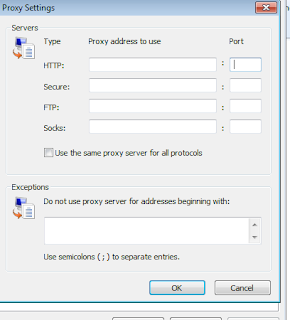

Click on Ok, then click No on the windows that will pop up.
Uncheck the checkbox of “Use a proxy server for your LAN (these Settings will not apply to Dial-up or VPN Connections)”.
Click on “OK”
Go to the internet
Once you are in the internet run Malwarebytes and combofix.
It should fix your computer internet issue. If you need more help just chat at the bottom box
(818) 745 8380 US
Good luck.




5 comments:
Thanks, Gannett Web site has collected data "the newsroom of the future." It will benefit all the people. appreciate the idea. and Yours truly
Locksmith in brooklyn
JAZEERA is be a chain of restaurants amalgamating authentic Mughlai cuisine prepared by chefs possessing expertise in Mughlai Food,Mughlai Dishes,Mughal Restaurant,Indian Mughlai Cuisine,Indian Food.
Mughlai Food,Mughlai Dishes,Indian Mughlai Cuisine
Thank you for the good writeup. It in fact was a amusement account it. Look advanced to more added agreeable from you! However, how could we communicate? Louis Vuitton Handbags.
Get Our Services Of Motion Videos
I will be really glad my spouse and I witnessed an excellent web site. I have to thanks a lot a lot of information! I enjoy we have saved your website for brand new things to examine send on the roads.
Pakistani 3D Animation Company
this is very essential post, it is really helpful for us.
thanks for sheering for the article.
https://waltonbd.com/computer/laptop/passion
Publicar un comentario